My name is Jay and I build things, mostly using computers, sometimes using legos or power tools. I have four amazing kids and an awesome wife. When not doing work-like things, I've backpacked Europe (twice), hiked the Appalachian trail, and biked the Camino de Santiago.
I originally wrote this memo to add to the onboarding flow of a previous company.
This is a draft of the unspoken assumptions we use for team decision making and work prioritization. Its goal is to help new people joining the company to understand how, and why, we do what we do and how, and why, we make certain decisions.
Decision Making
How do we come to decisions as a team? This is how we look at it:
Speed - We tend to favor solutions that can be implemented faster than solutions that take longer.
Complexity - We tend to favor less complex solutions over more complex solutions. How do we define complexity? Generally, if we have two solutions that are similar, but one of them has to touch two services (let's say two new Amazon Web Services we haven't used previously) and the other solution is a script somewhere (let's say the script would live on an existing server that we're already supporting) then we would probably favor the latter solution since it has only one touch-point (a script on an existing server) over the former solution that has two touch-points (we'd have to configure two new services to make it work).
Testing - We favor easier to test solutions.
Cost - Similar to complexity, if we can find a solution that gets us most of the way there (say 80-90%) and we don't have to change much to do it, we should seriously consider that solution first.
An example of this would be using DNS's round-robin support over adding a separate load balancer. Sure, the DNS solution isn't fully-featured, but it would get us 80% of the functionality of the load balancer and all we'd need to do is add some IP addresses to the DNS configuration, which has a way lower implementation and maintenance cost than adding and supporting an entirely separate load balancer.
Work Prioritization
How do we prioritize work? What criteria do we use? Generally, we try to iterate on our solutions.
For example, when we upgraded from python2 to python3, we broke the upgrade down into multiple discreet parts and then scheduled them when we had room over the course of nearly two years.
We first changed our environment to use python virtual environments instead of a global python installation so we had more isolation and flexibility with the python version we were using. Then we updated each external library to python3 compatible versions. Then we upgraded the underlying operating system to the latest version. And only after all that did we actually upgrade our python version and complete the upgrade.
The easiest way to get a big new initiative started is to break it into discreet parts and work to get each of those parts scheduled. We try and let everyone schedule pet or passion projects in between core functionality that is needed to push the business forward. Passion/pet projects are not only big new initiatives but also things like getting rid of some technical debt, upgrading dependencies, and finally fixing things that are driving people nuts.
Communication
Please don't come into a meeting and complain about how everything is wrong and it all needs to be re-written, that's the surest way to get the entire team to ignore all your current, and possibly future, suggestions.
If you find that meetings are getting heated, or you're thinking things are unfair, it might be because of a definition or unspoken assumption problem. Read this entire document again and decide if the more tenured members of the team are using an unspoken assumption that you're not.
If you do have a different assumption than the rest of the team then we should talk through it and decide which assumption we should move forward with for this specific project, and maybe all future projects also.
If we're all on the same page regarding assumptions, then there might be a definition problem. Different members of the team might have different interpretations of a word's meaning. For example, we had some heated meetings about a solution because the engineer who proposed the solution had a different meaning of the word scaling than the rest of the team. This could've been cleared up by a simple definition check.
Success
We want all team members to succeed here, and not just succeed, but do their best work. We're not trying to optimize for one feature or one product, but for the entire team to to do their best work over months and years, and we've found these unspoken assumptions have helped us accomplish that goal over and over again.
This is an edited and cleaned up version of the eulogy I gave at my dad's funeral. I remember an Elder Holland quote from around the year 2000 about serving a mission and how there hasn't really been one day since finishing his mission that he didn't think about it. It's now been awhile since my dad passed away and, while it has gotten easier and life has gone on, I'm pretty sure there will never be another day I won't think of him. I miss him...every day.
My dad died on July 7, 2021. I got the phone call at 7:27am and as I walked to my parent's house:
They were picking up trash.
Sprinklers were on at the neighbor's house.
There were birds chirping.
You know how in a lot of action and disaster movie trailers, there is always a narrator, who says, in a deep foreboding voice, that movie trailer voice, “nothing will ever be the same again!"
That's what that day, that moment, felt like to me.
For everyone who knew my dad, the world really won't ever be the same again.
My dad has been at every significant event in my life!
My wife noticed the other day, as a lot of family and friends were posting tributes to dad on their Facebook feeds, that almost all the tributes included a picture.
And she commented about how nice it was that there were so many pictures to choose from, because he showed up to so many things.
He really was there, at all the big moments and the little moments, my dad was there!
Young Jay
When I was a kid dad was an audio/visual professor at a California state university. I still have no idea what he actually taught, but I do remember he would bring all these paintings and other artwork home from his students.
He would set up a card table in the living room and grade all the art while watching TV, and I would sit under the card table and look at all of the paintings, drawings, and illustrations before handing them up to him. I love art because of moments like that.
Teenager Jay
We moved to Utah in 1989, and dad ran the ASVAB test for the military, I know this because he would ask all my friends if they had heard of the ASVAB, the Armed Service Vocational Aptitude Battery Test, and then give them a whole pitch on why they should take the ASVAB and what it could do for them.
Teenage me found this incredibly embarrassing at the time, and it's been an inside joke in our family for years and years ("have you heard of the ASVAB?" in a mocking voice), but it's stuck with me to this day, my dad liked his job!
Pre-Mission Jay
Before I left on a mission for the Church of Jesus Christ, I was going to school down in southern Utah. My parents were living in Maryland at the time.
I needed to get from southern Utah to Maryland and my dad came up with the solution. He drove from Maryland to Southern Utah to pick me up.
Then we went to northern Utah.
Then to California.
Then to Washington state.
Then to Montana.
Then to Chicago, Illinois so I could visit the Art Institute of Chicago. Dad knew one of my favorite paintings hung there and he wanted me to see it in person.
Then home to Maryland.
He planned the whole thing, I was just along for the ride. And over the years I've thought of that trip so many times.
Post-Mission Jay
After my mission, I signed up to attend Utah Valley University, and my dad took me down to Provo and helped me move into my apartment.
While we were moving in he told me he thought I should go to BYU instead, he'd gone to BYU after all.
I told them there was nothing we could do about it now. He disagreed.
He took me to the admission's office at BYU, he talked with the front desk people.
I was embarrassed, standing behind him.
The front desk people went and found an admissions officer, and the admissions officer had us come back to his office.
My dad did all the talking, and before I knew what was happening, I was enrolling in BYU.
I have a Computer Science degree from BYU because of my dad.
Current Jay
A few weeks ago I sent a picture to him of a painting we were thinking of buying at the art fair, I wanted his thoughts.
Two weeks ago, just hours before I drove him to the Emergency Room, he was feeling better so we went to lunch, he wanted Olive Garden because he felt like their soup, and mom reminded him I don't like the Olive Garden, and so he said we could go somewhere else.
I told him if he wanted the Olive Garden, we're going to the Olive Garden.
None of us knew at the time that would be his last real meal, but even then, he was willing to go somewhere else to make sure I was good. That was my dad!
Stories
Every one of us has stories like the ones I just told.
Gary
Gary told me about how, when he was a teenager, dad was kind of a big deal in their ward among the youth, everyone knew him and liked him, and so when they found out that Gary was his son then they would say things like you're so lucky and it must be so cool to be his son. Gary always felt like a rockstar because of dad.
Becky
Becky can talk about how dad pulled off the road once in the middle of nowhere desert because he could see a lake out there and they kept going and going because dad could see the lake, which was obviously a mirage, they went until they got stuck in the sand, they couldn't even see the road anymore and David and Gary were able to find an old metal sign and that gave them enough traction to get unstuck. They never tried to find a lake again out there.
David
David can talk about how the parents got sick of taking him to early morning seminary and so dad showed up one day and said I've got something for you and outside was a brand new 71 Mercury cougar, and dad handed him the payment book and the keys and told him to not be late on payments because it was in dad's name.
Yvonne
My dad adopted Yvonne after marrying mom, and Yvonne can talk about when he came in to pick her up for lunch at her office and her boss was saying how he knew dad was her dad because they look so much alike, dad just looked at Yvonne and winked.
Linda
Linda can talk about one time, in the 70s, dad picked her and Vic up and took them shopping, he said they could buy anything up to $25, and she chose a ring and he probably never knew that she still has it and it still means a lot to her.
Victor
Victor can talk about the time him and his friends "borrowed" a pizza from a pizza man without paying and they took it to a friend's house and the cops showed up.
The cop called dad and Victor heard on the phone, "kick his EXPLETIVE" and that's the first, and only time, Victor ever heard dad swear, and he was the Bishop at the time.
Kami
Kami can talk about all the mundane times she spent with dad, like dad driving her to school every morning. Or her stopping by his office when she got home for the night and him pausing the movie he was watching and chatting with her for awhile.
Or how she would ask him to find you something, and he would spend months tracking it down and one day she would come home and it would be there.
I had to laugh at that last one because dad did that for me also, I asked dad to look out for a book I couldn't find, not even on Amazon or eBay, and then, like a year later, I came home and it was sitting on my bed.
Lisa
Lisa can talk about how she recently took him to the rock fair and he was starting to get weak but they went through the whole thing and at the end he said he hadn't found something for my mom yet.
So they went back through all the booths again to find a little figure for mom, and when they found some, he examined every one of them until he found the one he thought she would like the best.
Mom
Mom told me that her and dad once took a class and the teacher asked them to write down what they liked about their spouse. She showed it to me the day he died, it was titled, "list of Dave's good qualities, 2001."
The list was 7 pages long.
Conclusion
In his book Sum: Forty Tales from the Afterlives, David Eagleman writes:
“There are three deaths. The first is when the body ceases to function. The second is when the body is consigned to the grave. The third is that moment, sometime in the future, when your name is spoken for the last time.”
Dad's first death was last week, his second death will be today, but I don't think he'll ever see that third death.
Dad will physically be missed, by everyone in this room, and countless others who couldn't make it today, but he won't be forgotten, he'll live on in get togethers and reunions.
A funny story here, or a joke he used to tell there.
Dad, we love you, we miss you, and we won't forget you.
Thank you for being our husband, our father, our friend.
These are my slides/notes from a small presentation I gave at a Walrus all-hands meeting in November 2020.
Let’s talk about forming habits...
But before we talk about forming habits, let’s define what a habit is and set some boundaries...
Changing long-term habits is rare.
Hooked (p25):
The fact is that successfully changing long-term user habits is exceptionally rare.
Habits are LIFO.
LIFO means "last in, first out." In other words, the habits you’ve most recently acquired are also the ones you’re most likely to drop first. ... The enemy of forming a new habit is your past habit because old habits die hard.
Even when we change our routines, the neural pathways remain etched in our brains, ready to be reactivated if/when we lose focus.
Habit forming time is variable.
BJ Fogg:
"there’s no research that shows 21 days is a good span to create a habit"
I had actually always heard 2 weeks, but whatever interval you’ve heard, it’s wrong and there just isn’t any evidence to back it up.
A 2010 study found that some habits can be formed in a matter of weeks while others can take more than five months (Hooked p31). The researchers, however, did find that the complexity of the behavior and how important the habit was to the person greatly affected how quickly the routine was formed.
Addictions are self destructive and are not the type of habits we are going to talk about forming.
A habit is when "not doing an action" causes a bit of pain. But the word pain is somewhat hyperbolic.
A better word might be itch. An itch is a feeling that manifests itself within the mind and causes a mild discomfort until it is satisfied. The habit-forming we want to do is to provide some sort of relief to this itch.
So now let’s talk about forming a habit in three easy steps...
Step 1. Think small.
BJ Fogg:
"To create a new habit, you must first simplify the behavior, make it tiny, even ridiculous. A good tiny behavior is easy to do, and fast"
Instead of saying you’re going to floss your teeth, say you’re going to floss 1 tooth. Instead of saying you’re going to read for an hour a day, say you’re going to open a book every day.
Step 2. Do it after something you already do.
BJ Fogg:
"put it after some act that is a solid habit for you, like brushing your teeth or eating lunch."
You need to find an after something slot for your new habit to live in. In other words, when trying to form a new habit, figure out what it can come after.
Step 3. Repetition
Once you’ve figured out what you want to do, and slotted it into your existing routine, you can now focus on actually doing it.
BJ Fogg:
"at first, you’ll need reminders. But soon the tiny behavior will get more automatic. Keep the behavior simple until it becomes a solid habit."
The idea is if you do something small, like floss one tooth, and commit to doing it after a normal part of your routine, like after brushing your teeth, chances are you will floss more than one tooth, but you can form the habit if you are committed to at least flossing one tooth.
Sources
The main sources for all this information is Hooked: How to Build Habit-Forming Products by Nir Eyal and BJ Fogg. BJ evidently came out with a book called Tiny Habits this year, but he came and talked to 500 Startups in like 2011 about forming habits and everything I talked about today is from my notes of that event, and I’m guessing the book expands on what he talked about at the 500 Startups event, so I’m looking forward to reading the book.
If I have a reputation for selling beautiful, ripe avocados, I have an opportunity. I can sell you a mediocre avocado at the price you would pay for the perfect ripe one. I will have mined my reputation.
...If [the avocado-buying public] could not themselves tell apart the good avocados from the mediocre, and in some cases, truly rotten, the new-avocado growers had little incentive to produce good new avocados. They could, more cheaply, produce bad new avocados
...a grower of delicious avocados would be unable to compete. He would have to sell his perfect avocados at the price of the overrated mediocre ones. If the costs for producing perfect ones were greater than the costs for producing mediocre ones, his orchard could be put to more profitable use.
Compare the above with this article from The Atlantic2 about the state of higher education in the United States (long snippet alert):
In 1969, almost 80 percent of college faculty members were tenure or tenure track. Today, the numbers have essentially flipped, with two-thirds of faculty now non-tenure and half of those working only part-time, often with several different teaching jobs.
...Administrators at these institutions of higher learning argue that they need to use adjuncts because it is the only way to keep tuition from rising even faster than it has.
...If the rationale for using low-wage professorial labor is affordable college, however, it hasn’t worked ... public universities cost three times what they cost in 1980, private universities twice as much ... but the student-teacher ratio remains the same as it was in the past.
...Even while keeping funding for instruction relatively flat, universities increased the number of administrator positions by 60 percent between 1993 and 2009, 10 times the rate at which they added tenured positions ... vice presidents, associate vice presidents, assistant vice presidents, provosts, associate provosts, vice provosts, deans, deanlets, and deanlings, all of whom command staffers and assistants ... So while college tuition surged from 2003 to 2013 by 94 percent at public institutions and 74 percent at private, nonprofit schools, and student debt has climbed to over $1.2 trillion, much of that money has been going to ensure higher pay for a burgeoning legion of bureaucrats.
As administrators make more and more faculty positions part-time, allegedly for cost savings, they don’t apply that same logic to themselves. While the part-time professor is now the norm, the percentage of part-time administrators has actually gone down. Their salaries, too, unlike those of professors, continue to go up, increasing by 50 percent between 1998 and 2003 even while tuition was going up and faculty numbers were going down.
...In 2013, colleges and universities devoted less than a third of their revenue to instruction ... One adjunct teacher, JJ, posting a comment online, calculated his/her pay as an adjunct as $65 per student per semester, adding up to the princely sum of $2,000, noting that “each student paid $45,000 in tuition and took about 4 classes a semester. ... I think their parents would be rather upset to learn that only $65 of the $45,000 went to pay one professor for an entire semester.”
Kinda sounds like college is being reputation mined doesn't it? Price has gone up but quality has almost universally gone down. That article was from 2015 and I think things have only gotten worse. But the memes have gotten better, in 2017 we were laughing about this image in a chat room:
which lead to this conversation between me and a friend:
FRIEND: The truth is that all markets yearn for equilibrium. If there is a fixed value associated with any asset, the cost of that asset will ultimately match the value.
ME: what a rational view 😊
I would look at it more as reputation mining, college was such a good deal for so long that it built a great reputation, that reputation has been taken advantage of by people who are willing to raise the price past all rationality, relying on past reputation to take advantage of a quirk in people
eventually though the reputation will crash and the bubble will be reset to the true mean of the value of the asset, the sad part here is that can take years, if not decades, which is why we get bubbles
And here's one more meme image:
Even if the numbers in the image aren't factually accurate (I have no idea) I think they are directionally correct. College costs a lot more now.
I had a conversation with a mentor right before I got my undergrad degree about whether I should attend law school, he talked about how a law degree was such a valuable degree, how he never regretted his, best money he ever spent, and other such things.
The big difference between him and me though was law school cost him about $10k total, and his first job out of law school paid more than that, so it really was a great deal. Law school was going to cost me over $200k, and I wasn't going to make anywhere close to that on my first job, so it wasn't as good of a deal for me, and that fact weighed heavily in my decision not to attend.
I'm starting to hear about more and more people deciding that college might not be that great of deal for them and I can't help but wonder if college's reputation has finally been completely mined? That's the tricky thing about reputation mining though, when it appears we all benefit from the lie it's tough to finally see the truth.
Interesting point by @Jesse_Livermore on the speed of reputation change:
"If the education standards at Ivy League schools dropped, it would take a long time to undo the perception that people who go to Ivy Leagues are smarter than those who don't."
Which is really our three distinct permission groupings--the dash means the group does not have that permission--so user has read and write permissions (rw-), group has read permissions (r--), and other has read permissions (r--).
We can convert those three groupings into their corresponding numeric value equivalents: rw- = 42-, r-- = 4--, and r-- = 4--.
Then, we can sum up those level values and mash the totals together: 4+2=6, 4=4, and 4=4.
So the final permission value is: 644.
And the chmod command would be:
$ chmod 644 file.ext
Example 2
rwxr-xr-x
This time, user has read, write, and execute permissions (rwx), group has read and execute permissions (r-x), and other has read and execute permissions (r--).
I'll be honest, I mainly use numeric permissions (not sure why) but symbolic permissions are super handy because they allow us to just change one grouping without touching the other groupings we're not interested in, so let's say we just wanted to add a read permission level to the other grouping, the command would be:
chmod o+r file.ext
Or if we would rather take away the read permission level from the other grouping:
chmod o-r file.ext
And that's it! An incredibly basic explanation of permissions, now that it's unleashed from the confines of my notes maybe it can help someone. Somewhere. Someday.
I've found man chmod is a great resource--if you already understand what the heck you're doing. ↩
It would actually look like -rw-r--r-- where the first dash tells us if it's a file, directory, or symlink. ↩
These are my slides/notes from a presentation I didn't give during Voi Health's winter meetup at Lake Morey resort in Vermont
Narrator: "There were no slides."
They say you should start every presentation with a joke but this time the joke is on me, because no one prepared slides but me.
"How did you go bankrupt?" "Two ways. Gradually, then suddenly."
Does anyone know where this quote comes from?
Ernest Hemingway, The Sun Also Rises
I actually thought this quote was from The Great Gatsby1, I had a great picture of Leonardo DiCaprio holding up a wine glass looking smug here, so you can imagine my utter disappointment when I went to confirm the quote.
Anyway, this quote is to get us in the right mindset to talk about...
Shipping containers!
Or as I like to call them, the internet of the 50s and 60s
Simple containers show up moving coal in England by both boats and horse drawn carriages.
In 1766, James Brindley designed the box boat Starvationer with ten wooden containers, to transport coal from Worsley Delph (quarry) to Manchester by Bridgewater Canal.
In 1795, the Little Eaton Gangway opened and carried coal in horse-drawn wheeled wagons which, in form and function, were a bit like containers.
In the 19th century, shipping containers make an appearance on certain railway lines, I couldn’t find any pictures so you get a picture of my kids in front of a 19th century replica steam engine at the Golden Spike National Historic Site in the middle of nowhere Utah, instead.
By the 1830s, railroads on several continents were carrying containers that could be transferred to other modes of transport.
By the 1840s, iron boxes were in use as well as wooden ones.
This is a Windjammer, in the 19th century most cargo is hauled using ships like this, and though the modern shipping container makes an appearance around 1917, it’s use is extremely limited.
The S.S. Stromboli
The use of shipping containers is so limited in fact, that this is a typical cargo ship in the mid 20th century, not a shipping container in sight.
The Ideal-X
Then came the Ideal-X in 1956, it was a WW2 oil tanker modified by a company called SeaLand to hold shipping containers.
on April 26, 1956 the Ideal-X carried 58 containers from New Jersey to Texas, where 58 trucks were waiting to be loaded with the containers, and the modern global supply chain is born.
And here’s what a typical cargo ship looks like today.
Some stats on how fast (nod nod wink wink) the shipping container took over the world:
The cargo flow through one terminal at Newark jumped from 228,000 tons in 1957 to 1.1 million tons in 1959.
Registered longshoremen on the U.S. East Coast falls by over two-thirds from 1952 to 1972.
"'In 1966, commitments by ship operators and ports to containers passed the point of no return,' ... Only three ship lines were offering international container service from the United States in the spring of 1966. By June 1967, one researcher counted 60 companies offering container service to Europe, Asia, and even Latin America" (The Box ch8)
to recap...
The Ideal-X makes its maiden voyage in 1956, over 200 years from the first shipping container, and 40-ish years from the first "modern" shipping container (in 1917). In 1966 (just 10 short years later), shipping containers pass a point of no return and the entire world is changed.
So how did shipping containers take over the world? Gradually, then suddenly!
Maybe you’re asking yourself what do shipping containers have to do with Voi?
The answer is obvious, the blockchain of course (just kidding).
I like finding patterns that I can apply to my life and my job.
So what patterns do you think we can find in shipping containers?
Sometimes, working at a startup can feel like you’re in the middle of a desert, low on water, short on supplies, all hope is lost.
And then in the very next moment everything can change.
"The scene pictured here is one of perpetual construction—building as one goes"
Sound like anything else you know?
Here’s a description of SeaLand, the company that built the Ideal-X, and ushered in the modern shipping era:
"SeaLand’s initial technology had been designed on the fly, using obsolete tanker ships, shipbuilding cranes, and containers whose length was determined by the size of the tankers, on the assumption that it could all be improved once the business was up and running." (The Box ch4)
It took over 200 years for the shipping container to break out, but when it did, the entire world changed in about 10 years.
It took First Opinion 4.5 years to become Voi, but in those 4.5 years:
We laid all the groundwork
We put good processes in place
We analyzed markets
We learned, boy did we learn
We brought everyone in this room together
McKay and I were on some introductory phone call with a bunch of you and some other people that aren't any of you, and everyone was introducing themselves, after our team finished introducing themselves I commented to McKay over chat:
"I get goosebumps when I listen to our team introduce themselves"
And I do. This team gives me goosebumps. And each one of you has helped us build this incredible team.
All this is to emphasize the thing we’ve done over the last 4.5 years:
We prepared for this moment, right now, 2018.
While studying [successful people], one thing that becomes evident is many of them put in years of intelligent, diligent, and obsessive work before they hit their inflection point.
The inflection point, if visualized, isn’t an explosion but a wave. It is the result of countless incremental improvements or breakthroughs that build up over a period of years that finally crest and accelerate the business at a rapid pace. (via)
2018 is our crest, everyone in this room is here for a reason, everything is in place, we’ve made it through the gradually part, now it’s time for the suddenly part!
I also thought the quote was "slowly, then all at once." ↩
These are my slides/notes from a presentation I gave at Boom Startup in Utah in July 2011. I found this while cleaning up some old stuff in Dropbox and I figured I would make it public because why not?
Hello, my name is Jay, and I work at Plancast.
Startups are a wicked problem, a wicked problem is defined in Code Complete1 as something you have to solve first to know how to solve it.
Horst Rittel and Melvin Webber defined a "wicked" problem as one that could be clearly defined only by solving it, or by solving part of it (1973). This paradox implies, essentially, that you have to "solve" the problem once in order to clearly define it and then solve it again to create a solution that works. This process has been motherhood and apple pie in software development for decades (Peters and Tripp 1976)...
One of the main differences between programs you develop in school and those you develop as a professional is that the design problems solved by school programs are rarely, if ever, wicked. Programming assignments in school are devised to move you in a beeline from beginning to end. You'd probably want to tar and feather a teacher who gave you a programming assignment, then changed the assignment as soon as you finished the design, and then changed it again just as you were about to turn in the completed program. But that very process is an everyday reality in professional programming.
The only way to know if a startup will work is to try it and find out.
Markets that do not exists cannot be analyzed: Suppliers and customers must discover them together. Not only are the market applications for disruptive technologies unknown at the time of their development, they are unknowable. The strategies and plans that managers formulate for confronting disruptive technological change, therefore, should be plans for learning and discovery rather than plans for execution. This is an important point to understand, because managers who believe they know a market's future will plan and invest very differently from those who recognize the uncertainties of a developing market."
I think it was Steve Blank who said a startup is a company formed to find a business model.
No One Size fits all...not for building your company or, on the technical side, solving scaling issues.
This is the first Plancast Techcrunch traffic spike.
Plancast's database Munin CPU graph, trying to figure out a rogue query right before SXSW.
Funny story, the rogue query was a SELECT * FROM users that was buried in a certain page load and had existed from Plancast's inception. The query wasn't a resource drain in the beginning (small user base) and so it sat there...waiting. I never noticed it because it blended in with the normal server load increases that come from a growing user base, but when we hit a critical mass of users it all of a sudden appeared, literally like flicking a switch, and became an exponential resource hog that kept taking the site down.
I said there is no one size fits all, but now I'm going to retract that a bit and say there are certain things that are pretty much universally needed across all companies.
No one cares what happened in the past. We lose half our content every. Single. Day. So there is no evergreen content benefit like other sites might have.
Normal people don't like to do things4, this has caused us to Pivot to support more "professional" events.
Spend where you should, be very careful about who you hire and how you spend your money.
Developers should have nice chairs and nicer computers and monitors.
We comically over-provisioned our app and db servers, everything else we cut corners on.
He told me a story of how Larry Ellison actually got efficiencies from teams. If a team wasn't productive, he'd come every couple of weeks and say "let me help you out." What did he do? He took away another person until the team started shipping and stopped having unproductive meetings. (via)
Plancast world headquarters, circa 2011
We suck at hiring, so I've got nothing to say about that6.
Never too early to start defining your company culture.
Ours is helicopters. And I'm not a morning person.
Choose wisely! All of our downtime for the last three months has been because of MongoDB7.
Rasmus Lerdorf:
I have absolutely no problems annoying the one or two pedantic people who care about this for the benefit of thousands who don't.
Time for an old-school analogy question: Silicon Valley is to entreprenuers as blank is to actors?
I still miss this view from Plancast's office
Hoooooray for Silicon Valleywood!
I can't say where a startup should be located, I can say it is cool to be at a party and look over and see the Twitter founders. Or to hang out after some dinner event and listen to Prominent Venture Capitalist talk about raising money for his fund. There is just no other place in the world where stuff like that happens every. Single. Night8.
Any questions?
Any questions at all?
Code Complete, section 5.1, Design Is a Wicked Problem. ↩
Plancast was never larger than about four people, but the people we did hire were amazing, so maybe suck was too strong a word, it might be better phrased as we were incredibly slow to hire. ↩
Here's a fun game: guess what database Path had the most problems with? ↩
I still think this is true and still chose to leave Silicon Valley because there are many other factors that go into choosing where to live, like how good the schools are, or if you want to own your own home, or you like seasons. Also, Israel is pretty great also if you want a tech capital on the other side of the world. ↩
This post was originally published in 2012 on the Startup Grind blog, I've cleaned it up, updated it a bit, and republished it here for archival purposes (also I was pretty surprised I hadn't posted it here already)
For a content site1, be it a blog like this one or a social networking site like Twitter. Attracting--and keeping--users is the hardest thing they will ever do.
Getting a ton of users is the hardest part of any business, that being the case, why would you choose a business model that depends on you getting a ton of users? -Ben Thompson
The answer to that question is obvious, you choose this business model because the rewards are ginormous! But when you do choose it, it's the only thing that matters. Scaling? Hiring? Funding? All that is cake compared to getting millions of people to use your product, which is the new baseline for success.
In all my internet travels, I've seen a lot of sites come and go, I've even tried my hand at one or two of my own, and one thing all content sites have in common is how they turn a random visitor into a loyal user--and how they lose that same user later down the road. I call this pattern the law of three:
A user has to visit a site three times in order to become loyal.
A loyal user needs to find three interesting things each visit to stay loyal.
A loyal user is lost if they don't find three interesting things three times in a row.
Simple, right? Yet most entrepreneurs, when they talk about acquiring new users, they talk sign up flows, a/b testing, and viral coefficients. Those are all important, but they should all come after making sure their content is interesting to the users they are trying to attract. Otherwise, no matter how many users they get coming through the door, those users just turn around and go right back out again.
Simpsons did it first!
My favorite anecdote about greasing viral coefficients before getting the interesting content part in place (aka, putting the cart before the horse) was a startup that so effectively greased their viral coefficient, using techniques learned from Greg Tseng, that they literally increased their user sign ups from hundreds a day to tens of thousands a day but eventually had to rollback to their original--less successful--funnels because they were losing most of those new users due to a lack of compelling content.
Virality is an amplifier on a product that is already working, you should only focus on it if you are already getting it because it is very hard to manufacture it from zero -Andrew Chen
And just to beat this point home a bit more, from Ben Yoskovitz:
A founder that’s focused on user acquisition through virality, but can’t quite get the traction they want, should probably go back ... and make sure that the core users are actually happy and engaged. For B2B startups, they often jump the gun and try to scale revenue before really proving that they’re solving a super painful problem, and usage, engagement and retention are good. ... Startups, unfortunately, don’t spend enough time driving engagement and usage, and as a result don’t create enough sustainable value for their users and customers. They see a bit of usage and figure it’s time to rush into the Virality and Revenue stages, hoping that more users will solve all the problems they’re seeing and ignoring. That’s usually not how it works.
What sites people visit to get their content fix is constantly changing (Fun question, how many sites do you visit today that you also visited five years ago?), and each new site that rises up abides by the law of three. Currently, my wife is addicted to Pinterest2 because every time she visits she's flooded with tons of new and interesting pictures. As an aside (because it made me laugh), when I asked my wife why she loves Pinterest so much, she responded:
It makes you feel artistic and crafty just by looking at the pictures even though you didn't actually do anything
For me, the king of the law of three is Ars Technica, I've been a faithful reader for something like two decades3
In contrast, there was a time I couldn't go even a few hours without checking Digg4. Then one day I didn't find anything interesting. After a few more visits with nothing interesting catching my eye, I stopped regularly visiting Digg altogether, and I haven't really been back since. Users only have a certain number of content sites they visit regularly and so once you've lost a loyal user, it's really really hard to get them back. In fact, it might even be harder than getting them in the first place5.
Having trouble getting users to your own site? Step one is figuring out what things are interesting to the people you are trying to attract. After all, what your users get from your site is your core mechanic, and if it isn't up to snuff you'll never attract the audience you so richly deserve.
In 2012 I was using site only for website, now I'm using it as a stand-in for app or website. ↩
Fun fact, this was from 2012 and in 2017 my wife still visits Pinterest regularly. ↩
I've visited Ars Technica in three different decades, having first visited it in 1999. ↩
Digg was an entirely different site and company when this was originally written. ↩
As exhibit A I give you Twitter, who mentioned they've had over one billion sign-ups, but only a few hundred million active users, despite near constant media attention and exposure, those 700 million users are probably never coming back. ↩
These are my brushed up notes for a presentation I gave during one of First Opinion's all hands meetings in October 2015.
Types of Mistakes
I'll leave it up to you, dear reader, to decide which type of mistake this is
I want to start with a discussion of the three types of mistakes, as relayed to me by a good friend of mine:
Honest mistakes - Everyone falls victim to an honest mistake sometime in their life (I fall victim to them more than most). You accidentally push incomplete code to production or you leave an ad campaign running just a little too long. We're human, these mistakes happen, so we fix them and move on.
Incompetent mistakes - The people that are committing these mistakes are either out of their league, or incompetent. Either way, it's time to cut them loose or give them a different job.
Process mistakes - Most mistakes are because of a lack of process, so I want to spend the majority of my time talking about this type of mistake and how we seek to minimize them (nobody's perfect) at First Opinion.
Minimizing Process Mistakes
In Engineering
Let's start with Engineering, since I happen to know a thing or two about how the engineering team works.
Testing
The first line of defense for engineering is our automated tests. Each major piece of our codebase has a decent amount of tests backing it up, as a completely unscientific informal look at the amount of code we have written just to test the codebase, here are some conservative stats on our three biggest software areas1:
Server - 500+ tests comprising around 15,000 lines of code.
iOS - 60+ tests comprising over 10,000 lines of code.
Web-client - Many tests comprising around 5,000 lines of code.
Other - We have multipleopensource projects that also have decent testing suites.
We are constantly adding new tests and making sure the existing tests are still relevant so our Engineers can have that sweet sweet piece of mind that comes from knowing any changes they make to the codebase don't ripple outward like silent chaos ninjas to cause unforeseen bugs elsewhere in our system because without automated tests...
Making even small changes will become increasingly difficult. Eric Evans in Domain-Driven Design: "When complexity gets out of hand, developers can no longer understand the software well enough to change or extend it easily and safely." Facebook [needs] a huge staff to keep up their momentum maintaining a big ball of mud. ... Releases will break things, because you don't understand the relationships well enough to pretend the impact of your changes. ... Next time management or clients try to convince you to move faster and throw quality under the bus, you can say sure, that will work, as long as you can hire 429 engineers to work on our iOS app. via
In fact, our iOS engineers just spent the better part of the last two weeks knocking down the last untested part of the iOS application in an effort to release the most stable app we've ever released2.
Jarid also recently spent a solid week figuring out how to automate the testing of a new feature we're working on3. I guarantee our competitors didn't devote that much time to ensuring they could automatically test that feature, that's what makes us different.
Code Reviews
But wait, there's more. The Engineers also do code reviews, these are when one engineer has another engineer look over their code and make suggestions on how it can be improved. These are incredibly valuable in helping all the engineers understand the codebases and helps the codebase stay high quality and well documented since your best critic isn't yourself, it's your colleague who has to maintain your bug infested code.
Automation
We try and automate all the things. When we deploy, we deploy with one simple command. When we add servers to our system, that's also one command. Automation means we do things the same way each and every time, thus minimizing mistakes.
When we do find mistakes, we fix the automation scripts, for a change once, fix everywhere workflow.
In Product
We have a full time user researcher that is constantly going out and talking to people about our product and planned upcoming features. Think of that for a minute, we have someone whose whole job is to go out and speak to real people about our product, do you know any other company that does that?
Before any major feature gets anywhere near engineering, it's gone through multiple rounds of user testing using paper wireframes, Then onto small little interactive prototypes on the phone, and only after all that is the feature ready to be passed to engineering to be built.
On the doctor side
Each of our main doctors has a staff of support doctors that help them out, our matched doctors review the conversations and monitor the quality of the interaction each one of our users has on our service.
We also have a full time QA staff that works continuously to make sure each and every interaction with a Doctor on our app is a high quality one.
Besides that, we ask the user's themselves to rate their interaction with our doctors and take that feedback incredibly seriously.
But things always go wrong
It's true, they do, and we're no exception. So when a user does have a bad interaction, we kill them with kindness, and we work with them personally to make sure their issue is resolved to their satisfaction.
Post-Mortems
"Reverse engineer your successes and turn best practices into best processes"
-Howard Lindzon
Whenever we have problems, we go through what caused the problem and talk about how we fixed it and what we are going to do different to make sure we never see the problem again, this is the best way to make sure we are always solving new problems and moving forward, instead of going insane.
In Engineering, we also change the code, add tests, or automate the problem away, the goal of these post-mortems and the implementation of the solutions is to minimize the same mistake happening a second time.
We also do one more thing...
We pass it on down
You know you want a banana...go on...go...on...
Anyone familiar with the Banana story?
Start with a cage containing five monkeys. Inside the cage, hang a banana on a string and place a set of stairs under it. Before long, a monkey will go to the stairs and start to climb towards the banana. As soon as he touches the stairs, spray all of the other monkeys with cold water. After a while, another monkey makes an attempt with the same result - all the other monkeys are sprayed with cold water. Pretty soon, when another monkey tries to climb the stairs, the other monkeys will try to prevent it.
Now, put away the cold water. Remove one monkey from the cage and replace it with a new one. The new monkey sees the banana and wants to climb the stairs. To his surprise and horror, all of the other monkeys attack him. After another attempt and attack, he knows that if he tries to climb the stairs, he will be assaulted.
Next, remove another of the original five monkeys and replace it with a new one. The newcomer goes to the stairs and is attacked. The previous newcomer takes part in the punishment with enthusiasm! Likewise, replace a third original monkey with a new one, then a fourth, then the fifth.
Every time the newest monkey takes to the stairs, he is attacked. Most of the monkeys that are beating him have no idea why they were not permitted to climb the stairs or why they are participating in the beating of the newest monkey.
After replacing all the original monkeys, none of the remaining monkeys have ever been sprayed with cold water. Nevertheless, no monkey ever again approaches the stairs to try for the banana.
Why not?
Because as far as they know that's the way it's always been done around here.
While this story usually has a negative connotation, it doesn't have to be that way, passing down good company culture is a great thing and helps makes us stronger.
We learn from each other, hopefully we retain mostly the good stuff and fix the bad stuff.
In Conclusion
This fanatical obsession with scalable quality assurance has been going on from the very first line of code and the very first user/doctor interaction, to where we sit now at hundreds of interactions a day, to the future at thousands of interactions, and tens of thousands of interactions, and millions of interactions4. We focus so much on our internal quality because we know our internal quality eventually becomes our external quality.
This is what makes us different, this is what makes us special, and this is what will help us change healthcare.
This was incredibly unscientific, for example, in the iOS repo, I went into the testing directory and ran: find . -name "*.m" | xargs wc -l to get the line count. ↩
On Tuesday, November 8, 2016, some of us voted, and Donald Trump will be the next President of the United States.
Random photo of two americans whose faces reveal their disappointment with the election results
While watching the coverage of the election over the last year, I couldn't understand how any rational person could ever vote for someone like Trump, but even the most rational of people can work against their best interests when they feel unfairly treated, as demonstrated in an economic experiment called the ultimatum game1:
The first player (the proposer) receives a sum of money and proposes how to divide the sum between the proposer and the other player. The second player (the responder) chooses to either accept or reject this proposal. If the responder accepts, the money is split according to the proposal. If the responder rejects, neither player receives any money.
The responder typically vetos the deal when low offers are made. People consistently prefer getting nothing to receiving a small share of the pie. Rejecting the offer is in effect paying to punish the proposer.
The reason why this experiment is interesting is because in a completely rational world, the responder would accept any amount of money the proposer offers, because anything is better than nothing, right? Not so fast, we let emotion and passion guide us all the time, especially when we think we're getting a raw deal or feeling betrayed, as Ben Thompson wrote in his daily update after the election2:
People feel the system is unfair, that they don’t have a stake in it, and they are exceptionally mad. This is a sentiment that has been rising for decades thanks to globalization and the increase in manufacturing productivity that devastated so much of the Midwest in particular, but it was dramatically accelerated by the aftermath of the Great Recession [of 2008] when, in the estimation of people where I grew up, Wall Street got off scot-free while everyone else had to bear the pain. I cannot overstate how pervasive and deeply-felt this sentiment is: so many people I know — regardless of income level — deeply believe the system is rigged, so who cares if Trump destroys the whole thing?
David Wong says the same thing (seriously, if you only read one external link from this post, read this one) with a little more color:
They're getting the s**t kicked out of them. I know, I was there. Step outside of the city, and the suicide rate among young people f**king doubles. The recession pounded rural communities, but all the recovery went to the cities. The rate of new businesses opening in rural areas has utterly collapsed.
See, rural jobs used to be based around one big local business -- a factory, a coal mine, etc. When it dies, the town dies. Where I grew up, it was an oil refinery closing that did us in. I was raised in the hollowed-out shell of what the town had once been. The roof of our high school leaked when it rained. Cities can make up for the loss of manufacturing jobs with service jobs -- small towns cannot. That model doesn't work below a certain population density.
If you don't live in one of these small towns, you can't understand the hopelessness. The vast majority of possible careers involve moving to the city, and around every city is now a hundred-foot wall called "Cost of Living."
This sense of loss and unfairness has been rising for decades, but it feels like it has only been in the last eight years or so that this unease has reached the tipping point and started to manifest itself politically, Game Change touches on this unrest boiling to the surface during the 2008 elections:
As the election barreled toward its conclusion, something dark and frightening was unleashed, freed in part by the words of the McCains and Palin. At rallies across the country, there were jagged outbursts of rage and accusations of sedition hurled at Obama...
Colin Powell had been friends with McCain for twenty-five years. The senator had been actively seeking his endorsement ... Powell warned McCain that his greatest reservation was the intolerant tone that seemed to be overtaking the Republican Party. McCain’s selection of Palin bothered Powell because he saw her as polarizing ... And then there were the hate-soaked rallies...
The general’s repudiation was a stinging blow for McCain ... Powell represented the same brand of Republicanism as McCain’s. Tough on defense. Fiscally prudent. Pragmatic and nondoctrinaire. McCain had to wonder what had become of him if his current incarnation was repelling someone like Powell. He was startled by the crazies at his rallies. Who were they? Why were they there? And what did they see in him?
And, indeed, the first Tea Party candidates were elected in 2010, marking the beginning of a new era of political unrest.
Just before the election we packed up the kids and headed south from San Francisco to Disneyland. On our way we passed many a barren field with a sign reading, "congress created dust bowl"
And I bet you thought Congress never gave you anything
And oftentimes, right next to those dustbowl signs, was a "Farmers for Trump" sign:
Farmers like him because he tells them what they want to hear, which is totally different than other politicians
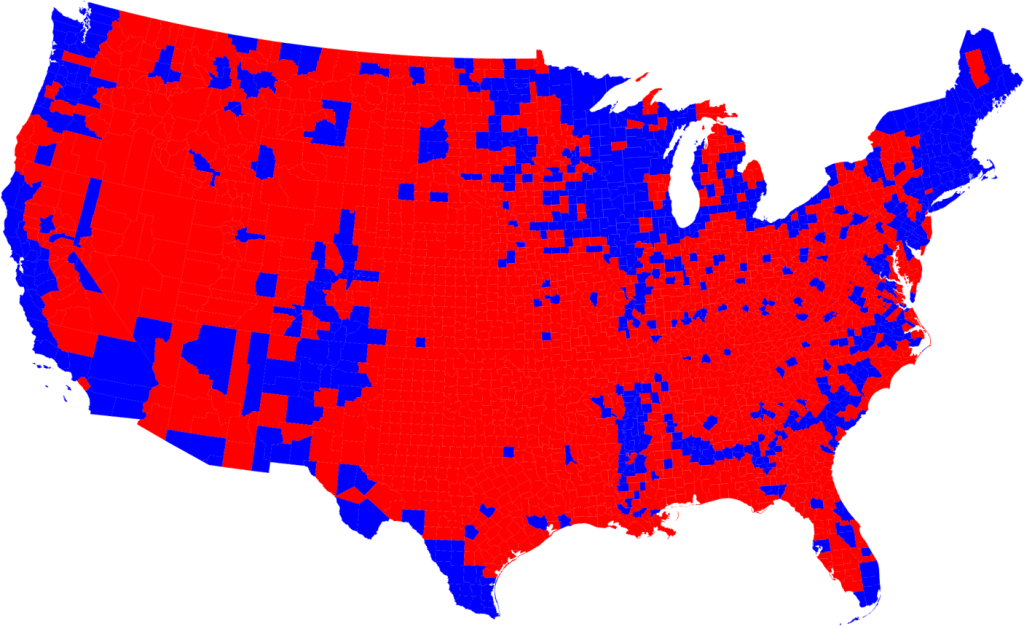
Signs like this are usually preaching to the choir though, because as it turns out, America votes by population density, more or less
As cities continue to grow in red states, those cities will become more blue, and ultimately, those states will become more purple, and then blue...
If you follow the red state trend lines, you can clearly see that any dense, fast-growing cities that might emerge in red states will be very likely to vote blue. The few that do already exist already vote blue. How would these new cities be different and [what would] cause them to vote red?
Let's try and answer that question: what would cause cities and/or states to vote red? There really are only two answers:
So how would you cause more rural voters to vote and less urban voters to vote? On the rural front, the answer seems to be a growing sense of unfairness, tinged with a fair bit of legitimate anger, and topped with a helping of more rural voters actually bothering to vote, in larger and larger numbers, in each election:
In 2008 and 2012, rural voters accounted for only about 19 percent of the vote in the state, but according to preliminary exit poll results, they account for 27 percent of the state’s vote. And Trump does well with those rural voters, winning them by about 15 points.
Trump leads Democratic rival Hillary Clinton by the commanding margin of 55 percent to 18 percent among farmers with operations of at least 200 acres.
Why would a lifelong urbanite ... enjoy such robust support in the heartland? The answer may lie in The Donald's unmatched ability to deliver an angry, frothing rant. The Agri-Pulse poll finds that 86 percent of respondents reported being somewhat or very dissatisfied with the way things are going in the United States...
As Siena Chrisman recently put it on Civil Eats, "Rural America is mad." She notes that Trump polls strongest in places where "white identity mixes with long-simmering economic dysfunctions," quoting a New York Times analysis. And few places combine embattled white identity and economic stress quite like farm country.
And how would you get urban voters to not show up? Choose some candidates no one is particularly excited about
I bet Mitt Romney is kicking himself right about now
Now let's visualize what that all those blue votes disappearing looks like using some 2008to2016 county maps (red for Republican, blue for Democrat):
HOLY CRAP! Why did all the blue dry up? Global Warming?
Notice anything? The incredibly shrinking number of blue counties by chance? Particularly among the rust belt cities, which have been hit really really hard over the last 8 years and maybe aren't enamored with the current status quo? So now we know, that's how you get previously blue voting counties to become red.
Growing up it was Saturday morning cartoons and these commercials
Now, let's look at some trends, why does rural vote red and cities vote blue? Well, for one, we seem to actually be physically separating ourselves:
heavily urban counties ... were 32 percentage points more Democratic in their voting than the average. The heavily rural counties were about 11 percentage points more Republican...
If you plot every county's urban-versus-rural divide by the per-election average change in the vote, the pattern is clear: more urban areas vote have been voting more Democratic...
What's particularly interesting is to see how each county has changed over time. Notice that urban areas, counties containing cities, have grown more Democratic; the counties surrounding them (usually suburbs) less so....
the political shifts that have emerged as people of like-minded politics have moved into similar and dense areas ... over time, the tension between rural and urban areas in every state could become significant factors in politics, if this polarization continues.
In the endless expanse of communications the Internet is, probably the greatest and most terrible gift it offers to furries ... is the ability to shut themselves off from the mainstream. They huddle in cloisters that are virtually unassailable by the outside world and whisper encouraging things to one another that would be nearly impossible to say in real life. Free from the pressures of society to conform to a boring standard they go in the exact opposite direction, externalizing things that are roughly as far from "normal" as can be expected. Then, within their protected virtual enclaves, they declare these things to be the norm. By declaring their perversions, mores, and general imbecility to be their own status quo they have simultaneously validated their own existence and demonstrated the inferiority of outsiders.
It seems that people just don’t want to compromise on anything anymore, and it seems to be getting worse and worse with each and every year, people are clustering to their respective side and refusing to venture towards the middle for any reason...
When you can surround yourself with a community that only shares your beliefs, you have a recipe for killing any and all compromise, why should I ever try and see your point of view when all my peeps over here are yelling and screaming that you suck?
in an aggregated world it is voters aka users who decide which issues get traction and which don’t. And, by extension, the most successful politicians in an aggregated world are not those who serve the party but rather those who tell voters what they most want to hear.
It’s tempting to imagine that rising political polarization is just a temporary blip and America will soon return to a calmer, friendlier political system. Don’t bet on it. Political polarization maps onto more than just politics. It’s changing where people live, what they watch, and who they see — and, in all cases, it’s changing those things in ways that lead to more political polarization, particularly among the people who are already most politically polarized…
It’s easy to see how this could work to strengthen polarization over time ... people become more extreme when they’re around others who share their beliefs. If liberals and conservatives end up moving to different places and surrounding themselves with others like them they’re likely to pull yet further apart. And even for those who can’t move, the internet makes it easy to settle in a virtual neighborhood with people who agree with you. Polarization is going to get a lot worse before it starts getting better.
Hillary Clinton had just about every single endorsement from newspapers and magazines across the country – as well as a majority of mainstream TV personalities – on her side, even if reluctantly. And it meant nothing at all.
And not only are people no longer listening to traditional gatekeepers, they are actively preventing established power structures from taking control from them:
Republican voters ultimately did go for Trump, however. In fact, they intervened to wrest control of the nomination back from the delegates. Until just a few weeks ago, Trump’s position had stagnated in national polls and in state-by-state results; before New York on April 19, he’d yet to win a majority in any state, lending credence to the idea that he might have a “ceiling” (albeit a higher ceiling than some originally expected) on his support. From New York onward, however, Trump has won a majority in every state ... with a sudden lunge upward after Wisconsin, rather than a smooth upward projection.
What happened after Wisconsin? My theory ... is that Republican voters were swayed by Trump’s arguments that the candidate with the most votes and delegates should be the nominee ... Some voters might have preferred Cruz or John Kasich to Trump in the abstract, but not at the expense of a contested convention in which the plurality winner would be denied the nomination and replaced with another flawed candidate.
A few weeks back I had the privilege of talking to a well known CEO, as the topic turned to politics, he talked about how Trump would never win, but when I pointed out that the people who voted for him don't actually go away when the election is over, he responded with, "yeah, what are they going to do about it?"3
A few days after the election, while talking to another CEO about the election, he asked, "what are we going to do about it?" Hopefully, this election marks a change of attitude for a lot of people (and a smidgen of empathy would be nice also), and the beginning of something great, because change rarely happens during times of political stability, but can come fast during times of instability, my hope is that any change is is ultimately positive, not just for a privileged few Americans, but for every american, in every state.
In the end, for all Trump's talk about how the election is rigged, I think we've just seen the best possible proof it is not. That ultimately, people will be heard, and how important each person's vote really is.
With the rise of alternative media sources, party elites lost their ability to control the flow of political information to voters, and an unprecedented figure of single-minded celebrity, authoritarian bluster, and nativist bombast ran away with the Republican primary. The party didn’t decide. Rather, like the concentration of political media itself, it seemed to dissolve.
the included quote is a mashup of this and this Wikipedia page. ↩
When I started writing this post I thought Trump was going to lose, and I was going to use this story as a means of talking about how when people are really angry, what they do is start revolutions: like The American Revolution, and the French Revolution, and the American Civil War. ↩